Working with Impurities
BioSNICAR models four built-in light-absorbing particle (LAP) types that can be mixed into any ice layer. Each has distinct spectral properties and uses consistent naming throughout the API.
Built-in impurity types
| Name | Key | Unit | Spectral signature |
|---|---|---|---|
| Black carbon | black_carbon | ppb | Strong broadband absorption, especially in visible |
| Snow algae | snow_algae | cells/mL | Visible absorption with carotenoid and chlorophyll features |
| Glacier algae | glacier_algae | cells/mL | Visible absorption with carotenoid and chlorophyll features |
| Mineral dust | dust | ppb | Weak, spectrally flat visible absorption |
These names work everywhere — in run_model(), parameter_sweep(), Emulator.build(), and retrieve().
Setting concentrations
Scalar (surface layer only)
from biosnicar import run_model

outputs = run_model(black_carbon=5000, glacier_algae=50000)
Per-layer list
outputs = run_model(glacier_algae=[40000, 10000, 0])Combining multiple impurities
outputs = run_model(
    black_carbon=5000,
    glacier_algae=50000,
    dust=1000,
)
Impact on albedo
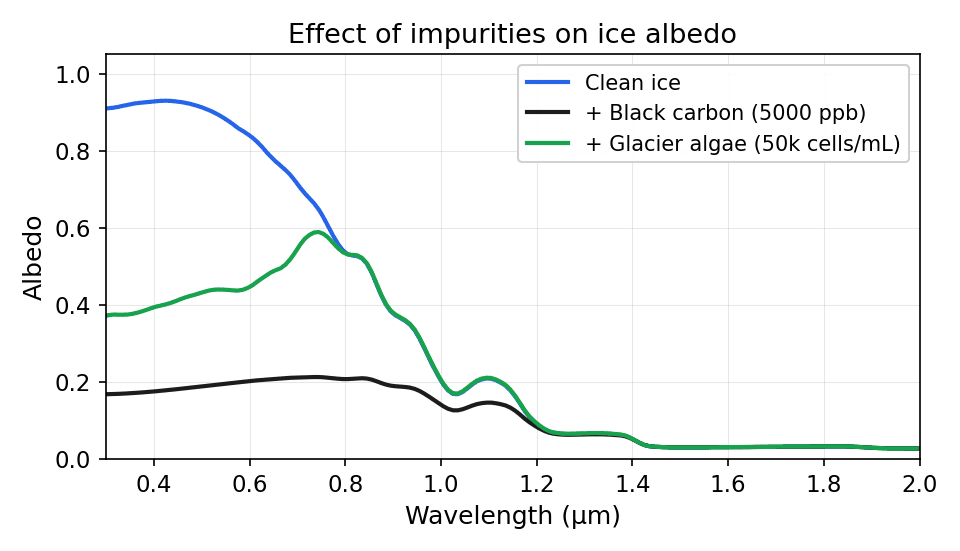
Impurities primarily affect visible wavelengths (0.3–0.7 µm). Black carbon has the strongest effect per unit mass due to its high mass absorption coefficient. Algae show characteristic absorption features from photosynthetic pigments. Dust has a relatively flat, weak spectral signature, making it difficult to distinguish spectrally from other darkening agents at typical environmental concentrations.
Optical property files
Each impurity key in inputs.yaml points to a specific optical property dataset inside the consolidated archive data/OP_data/480band/lap.npz. The defaults are:
| Key | Default file | Description |
|---|---|---|
black_carbon | bc_ChCB_rn40_dns1270.npz | Chang & Charalampopoulos (1990), r=40 nm, density 1270 kg/m³ |
snow_algae | snow_algae_empirical_Chevrollier2023.npz | Empirical measurements from Chevrollier et al. (2023) |
glacier_algae | ice_algae_empirical_Chevrollier2023.npz | Empirical measurements from Chevrollier et al. (2023) |
dust | dust_greenland_Cook_CENTRAL_20190911.npz | Greenland Ice Sheet mid-ablation zone, central estimate |
These are sensible defaults, but the lap.npz archive ships with 40 optical property datasets that you can swap in depending on your study site or research question.
Available datasets
Black carbon and brown carbon (5 variants):
| File stem | Description |
|---|---|
bc_ChCB_rn40_dns1270 | Black carbon, Chang & Charalampopoulos (1990) (default) |
brC_Kirch_BCsd | Brown carbon, Kirchstetter et al. |
brC_Kirch_BCsd_slfcot | Brown carbon, sulfate-coated |
mie_sot_ChC90_dns_1317 | Mie soot, density 1317 kg/m³ |
miecot_slfsot_ChC90_dns_1317 | Mie soot, sulfate-coated |
Mineral dust (24 variants):
| File stem | Description |
|---|---|
dust_greenland_Cook_CENTRAL_20190911 | Greenland, central estimate (default) |
dust_greenland_Cook_HIGH_20190911 | Greenland, high absorption estimate |
dust_greenland_Cook_LOW_20190911 | Greenland, low absorption estimate |
dust_greenland_central_size1 – size5 | Greenland, 5 size bins |
dust_balkanski_central_size1 – size5 | Balkanski et al., 5 size bins |
dust_skiles_size1 – size5 | Skiles et al., 5 size bins |
dust_mars_size1 – size5 | Martian dust, 5 size bins |
Volcanic ash (6 variants):
| File stem | Description |
|---|---|
volc_ash_eyja_central_size1 – size5 | Eyjafjallajökull ash, 5 size bins |
volc_ash_mtsthelens_20081011 | Mount St. Helens ash |
Algae (5 variants):
| File stem | Description |
|---|---|
snow_algae_empirical_Chevrollier2023 | Snow algae, empirical (default for snow_algae) |
ice_algae_empirical_Chevrollier2023 | Glacier algae, empirical (default for glacier_algae) |
Cook2020_glacier_algae_4_40 | Cook et al. (2020), 4–40 µm cells |
Glacier_Algae_IS | In situ glacier algae measurements |
snw_alg_r025um_chla020_chlb025_cara150_carb140 | Bio-optical model output |
Swapping optical properties
To use a different dataset, change the FILE field in inputs.yaml. For example, to switch from the default Greenland dust to Skiles dust:
IMPURITIES:
  dust:
    FILE: "dust_skiles_size3.npz"   # was: dust_greenland_Cook_CENTRAL_20190911.npz
    COATED: False
    UNIT: 0
    CONC: [0, 0]
Or to use sulfate-coated brown carbon instead of uncoated black carbon:
IMPURITIES:
  black_carbon:
    FILE: "brC_Kirch_BCsd_slfcot.npz"
    COATED: True        # use coated extinction coefficients
    UNIT: 0
    CONC: [0, 0]
The FILE value (minus .npz) must match a stem in lap.npz. To see all available stems programmatically:
import numpy as np

lap = np.load("data/OP_data/480band/lap.npz", allow_pickle=False)
print(lap["_names"])
Each stem stores three spectral arrays (480 values each): mass extinction coefficient (ext_cff_mss or ext_xsc for cell-count-based impurities), single-scattering albedo (ss_alb), and asymmetry parameter (asm_prm).
YAML fields reference
| Field | Values | Meaning |
|---|---|---|
FILE | Any stem in lap.npz + .npz | Which optical property dataset to use |
COATED | True / False | Use coated-particle extinction coefficients |
UNIT | 0 = ppb (mass), 1 = cells/mL | How concentration values are interpreted |
CONC | list of numbers | Default concentration per layer |
Bio-optical model
BioSNICAR includes a bio-optical module (biosnicar/biooptical/) for computing algal optical properties from pigment concentrations. This is useful when empirical optical properties are not available for your algal species.
Two cell geometries are supported:
- Spherical cells (Mie theory) — typical for snow algae
- Cylindrical cells (geometric optics) — typical for glacier algae (long chains of cells)
The model takes intracellular pigment concentrations, cell size, and density, and produces optical property files that can be loaded into BioSNICAR. Most users will use the default empirical optical properties that ship with the repository.
Adding new impurity types
To add a particle type not included in the 40 shipped datasets:
- Compute spectral optical properties (MAC, single-scattering albedo, asymmetry parameter) at 480 wavelengths
- Add it to the LAP archive (
data/OP_data/480band/lap.npz) using the build script inscripts/build_consolidated_npz.py - Add an entry to
inputs.yaml:IMPURITIES: my_new_impurity: FILE: "my_impurity_file.npz" COATED: False UNIT: 0 # 0 = ppb (mass), 1 = cells/mL (count) CONC: [0, 0] # default concentration per layer - Use the YAML key as the parameter name everywhere:
run_model(my_new_impurity=500)
parameter_sweep(params={"my_new_impurity": [0, 100, 1000]})